Parameter Sweep Example
This example demonstrates how to define a parameter sweep and run multiple parallel jobs using the param-sweep example in the repository.
Location: examples/param-sweep
Lab Definition
The lab is defined in nix/lab.nix and orchestrates a sweep followed by a plotting step.
# nix/lab.nix
{ pkgs, repx-lib, gitHash }:

repx-lib.mkLab {
  inherit pkgs gitHash repx-lib;
  runs = rec {
    # 1. The Sweep Run
    sweep_run = repx-lib.callRun ./run-sweep.nix [ ];

    # 2. The Plot Run (depends on the sweep)
    plot_run = repx-lib.callRun ./run-plot.nix [
      [ sweep_run "soft" ]
    ];
  };
}
The Sweep Definition
In run-sweep.nix, we define the parameters to sweep over. RepX automatically generates the Cartesian product of all list parameters.
# nix/run-sweep.nix
_: {
  name = "sweep-run";
  pipelines = [ ./pipe-sweep.nix ];

  # Define parameter lists here
  params = {
    slope = [ 1 2 5 ];
    # Add more parameters to expand the sweep
    # offset = [ 0 10 ];
  };
}
Topology Visualization
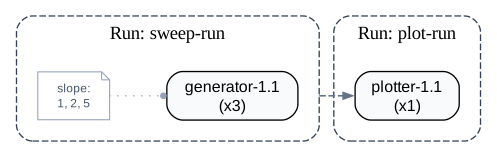
The topology shows that the sweep-run splits into multiple independent parallel jobs (one for each slope value), which are then all collected by the downstream plot-run.
Running the Sweep
-
Build the Lab:
nix build -
Run the Sweep:
repx run sweep-run --lab ./resultThis will execute 3 parallel jobs (slope=1, 2, 5).
-
Run the Analysis:
repx run plot-run --lab ./resultThis job will wait for all sweep jobs to complete, then aggregate their results.
Analyzing Results
You can query the results using repx-py:
from repx_py import Experiment
exp = Experiment("./result")

# Get all jobs from the sweep
jobs = exp.get_jobs_by_run("sweep-run")

for job in jobs:
    slope = job.effective_params.get("slope")
    output_path = job.get_output_path("data.csv")
    print(f"Slope: {slope}, Output: {output_path}")