Simple Pipeline Example
This example demonstrates a basic linear pipeline producing data and calculating a checksum. It also shows how to integrate repx-py for analysis.
Location: examples/simple
Structure
The experiment is defined in flake.nix, which imports the lab definition from nix/lab.nix.
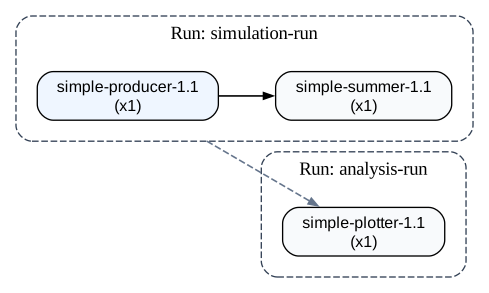
# nix/lab.nix
{
  pkgs,
  repx-lib,
  gitHash,
}:

repx-lib.mkLab {
  inherit pkgs gitHash repx-lib;
  runs = rec {
    # Run 1: Produce numbers and calculate a sum
    simulation = repx-lib.callRun ./run-simulation.nix [ ];

    # Run 2: Analyze the results of Run 1 using repx-py
    analysis = repx-lib.callRun ./run-analysis.nix [
      [
        simulation
        "soft"
      ]
    ];
  };
}
The lab defines two runs:
simulation: Runs the data production and processing pipeline.analysis: Depends onsimulation(soft dependency) and runs analysis scripts.
Running the Example
-
Build the Lab:
nix build -
Visualize (Optional): You can inspect the generated topology using the TUI or the
vizcommand.
-
Run the Simulation:
repx run simulation --lab ./result -
Run the Analysis:
repx run analysis --lab ./result