RepX TUI Reference
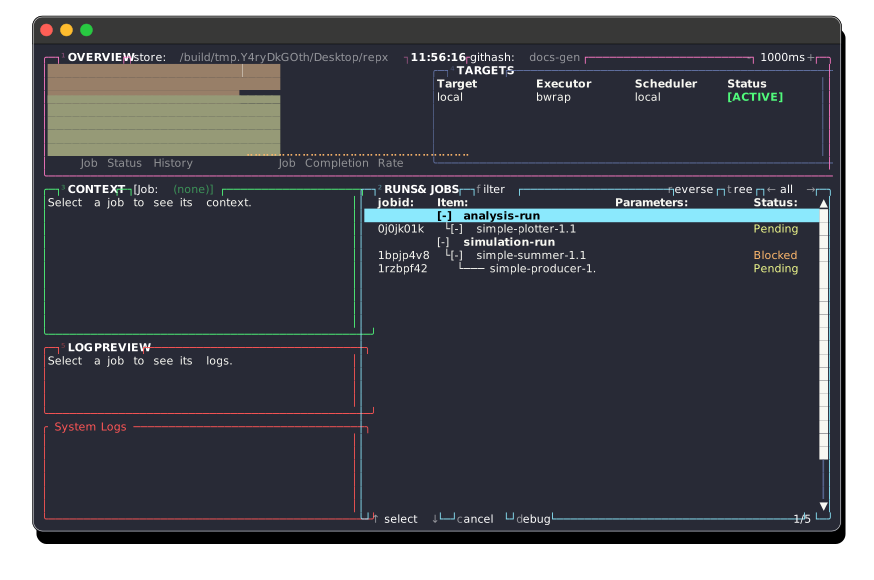
The repx-tui provides an interactive dashboard to monitor jobs, logs, and artifacts.
Run it with:
repx tui --lab ./result
Navigation
| Key | Action |
|---|---|
2 | Switch to Jobs panel |
4 | Switch to Targets panel |
Space | Open Action Menu (Run, Cancel, Debug, etc.) |
g | Open Go-To Menu (Quick navigation) |
q | Quit |
Jobs Panel
When the jobs panel is focused:
| Key | Action |
|---|---|
j / ↓ | Next job |
k / ↑ | Previous job |
t | Toggle tree view (hierarchical vs flat) |
. | Toggle collapse/expand of selected tree node |
x | Toggle selection and move down (multiselect) |
% | Select all |
/ or f | Filter Mode: Type to filter jobs by name |
l | Cycle forward through status filters (Pending, Running, Failed, Success) |
h | Cycle backward through status filters |
r | Toggle reverse sort order |
Targets Panel
When the targets panel is focused:
| Key | Action |
|---|---|
j / ↓ | Next target |
k / ↑ | Previous target |
Enter | Set selected target as Active |
Menus
Space Menu (Actions)
r: Run selected jobsc: Cancel selected jobsd: Debug (inspect) selected jobp: Pin/Unpin current lab as a GC root (see Garbage Collection)l: Show global Logsy: Yank (copy) path to clipboarde: Explore output directory (opensyazior shell)
G Menu (Go To)
g: Go to tope: Go to endd: Open job Definitionl: Open job Logs
Z Menu (Fold Controls)
z: Toggle fold of selected nodeo: Open (unfold) selected nodec: Close (fold) selected nodem: Fold all nodesr: Unfold all nodes
Indicators
- [Pinned]: A green badge in the overview panel title bar indicates the current lab is pinned as a GC root on the active target. Toggle with Space > p.
External Tools
The TUI integrates with external tools for an enhanced experience:
yazi: Used for file exploration when pressingeon a job.$EDITOR: Used for opening files. Defaults toxdg-openlocally. For remote targets, the remote machine's$EDITORis used (withvias fallback).